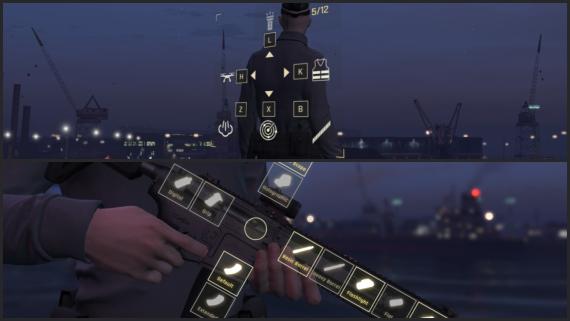
FiveM Interactive Weapon Customizer
Customize weapon attachments in the heat of the moment. Add this Battlefield 2042-inspired interactive overlay to your r...
Key Features
Works with ESX • QBCore • Qbox
Available in a bundle!
Save 25% when you purchase this package as part of the Weapon Customizer & Power-ups Bundle.
View bundleWhat's included:
- Full script files
- Configuration files
- Installation documentation
- Lifetime updates
- Discord support
Overview
Customize any weapon at any time, altering weapon attachments right in the heat of the moment. Inspired by the Battlefield 2042 weapon customization, this interactive overlay might just be the addition you're looking for to further enhance immersion in your roleplay or combat server.
Features
- Configure any weapon with the desired attachments and optional item-requirements/job-restrictions.
- Works as a standalone script without any requirements, but it is also configured and tested for ox, esx and qb inventory systems.
- The components are saved through the respective inventory systems for seamless integration into your existing server.
- All default GTA-5 weapons and their components have already been configured.
- Addon-weapons can also be added and configured.
- The animations, overlay images, labels, sound effects, component locations and much more are all configurable.
Resmon: Idle: 0.00ms - When customizing: 0.01ms.
Installation
After purchase, download the resource from portal.cfx.re (Assets > Granted Assets), add it to your server resources folder, and ensure the resource in server.cfg.
Step-by-step setup, configuration, and dependency details are in the install guide for this script.
Configuration
All scripts include easy-to-edit configuration files. Common settings include:
- Language/localization options
- Feature toggles
- Price and economy settings
- Notification preferences
Escrow vs Source: Which Should You Choose?
Escrow (Encrypted)
Best for server owners who want plug-and-play functionality.
- Protected code files
- Easy configuration via config files
- Same features as source version
Source (Unencrypted)
Best for developers who need full customization.
- 100% editable code
- Full customization freedom
- Same features as escrow version
Same features; editability differs.
What others say
"Just Bought This Script And It Is Amazing! Great Work Like Always!"
- NotRexed