FiveM Interactive Power-ups
Add exciting power-ups to your FiveM server. Boost health, speed, or damage with interactive pickups, perfect for arcade...
Key Features
Works with ESX • QBCore • Qbox
Available in a bundle!
Save 25% when you purchase this package as part of the Weapon Customizer & Power-ups Bundle.
View bundleWhat's included:
- Full script files
- Configuration files
- Installation documentation
- Lifetime updates
- Discord support
Overview
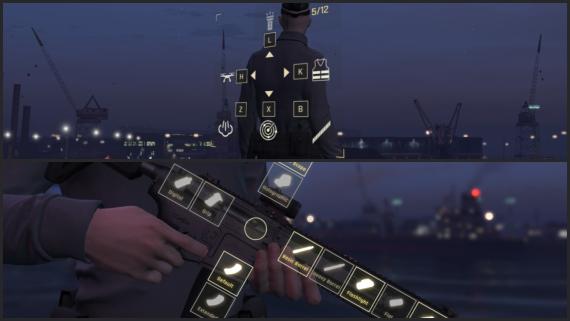
Looking to bring a vibrant and unique menu full of new features to your server? This Interactive power-up menu is a fully customizable menu, with build in features like a flashlight, rappelling rope, area scan, mini-drone and much more.
Features
- The overlay position and rotation is updated with the player and camera movement, creating an immersive 3D effect.
- A total of 8 slots are configurable with a unique power-up, cooldown, job/item restriction, icon, sound-effect and more.
- Can works as a standalone script without any requirements, but it is also configured and tested for ox, esx and qb to handle item and job restrictions.
- Includes 6 highly configurable power-ups, which are described in more detail below.
Power-ups included with the script (any power-up can be tweaked or removed)
- A toggleable flashlight, which is synchronized between nearby players.
- An area scan, revealing either all nearby peds or only real players for a defined amount of time.
- A mini-drone, looks for nearby peds or only real players, and aims a laser at the closest one.
- A smokescreen to quickly create cover.
- The ability to equip armour.
- A rappelling rope, enabling you to rappel down any building (only partially synced between clients).
- (Additionally) an indication of the ammo in the currently equipped weapon.
How it works
- Press [E] (or another configured key) to open the overlay.
- Use a configured key, to toggle a power-up.
- The power-up is executed, if you meet the cooldown, item and/or job requirements.
- After the cooldown has passed, the power-up is ready to be used again.
Resmon: Idle: 0.02ms - Overlay with power-ups active: 0.04 to 0.1ms
Installation
After purchase, download the resource from portal.cfx.re (Assets > Granted Assets), add it to your server resources folder, and ensure the resource in server.cfg.
Step-by-step setup, configuration, and dependency details are in the install guide for this script.
Configuration
All scripts include easy-to-edit configuration files. Common settings include:
- Language/localization options
- Feature toggles
- Price and economy settings
- Notification preferences
Escrow vs Source: Which Should You Choose?
Escrow (Encrypted)
Best for server owners who want plug-and-play functionality.
- Protected code files
- Easy configuration via config files
- Same features as source version
Source (Unencrypted)
Best for developers who need full customization.
- 100% editable code
- Full customization freedom
- Same features as escrow version
Same features; editability differs.
What others say
"Very cool all in one package and price is great too, well done!"
- Muwah
See more scripts on the FiveM minigame scripts page.