FiveM Forklift Operator Job
Drive a forklift at the Port of Los Santos in FiveM. Pick up and deliver pallets, earn per delivery, and enjoy immersive...
Key Features
Works with ESX • QBCore • Qbox
Available in a bundle!
Save 30% when you purchase this package as part of the 5-in-1 Civilian Job Pack.
View bundleWhat's included:
- Full script files
- Configuration files
- Installation documentation
- Lifetime updates
- Discord support
Overview
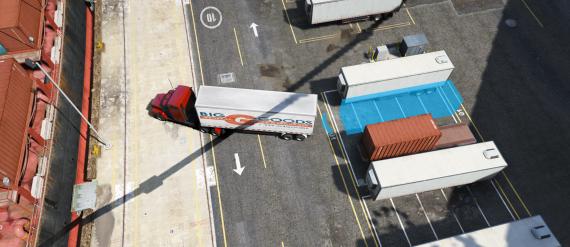
Looking to add a realistic dock job to your server? The forklift operator job puts players behind the wheel of a forklift at the Port of Los Santos, picking up pallets across the docks and delivering them to their marked destinations. With a deposit system, vehicle health checks, and a large spread of hand-placed pickup and delivery points, every shift feels like a proper day of work.
Key features
- Dock worker NPC: A dockworker NPC at the Port of Los Santos handles shift sign-ups. Interact via `ox_target`, `qb-target`, or the built-in 3D text fallback.
- Forklift deposit system: Players pay a configurable deposit to begin their shift. The deposit is automatically refunded when the forklift is properly returned, adding accountability to the job loop.
- Pallet pickup & delivery: Pallets spawn as props from a pool of 8 dock-themed models and attach to the forklift's forks when driven close enough.
- 74 pickup & 19 delivery points: Pickup and delivery locations are spread across the entire Port of Los Santos area. Each round selects a random clear pair with a minimum separation check to keep deliveries interesting and avoid overlaps.
- Damage & distance monitoring: Shifts are automatically cancelled if the assigned forklift is damaged beyond configured thresholds, goes missing, or the player wanders too far from it. With a configurable grace period before enforcement kicks in.
- Blip & route guidance: A map blip with an active GPS route updates dynamically as objectives change — pointing to the current pallet pickup or delivery slot, and showing the return zone whenever the player is on shift.
- Framework compatible: Works standalone and integrates with ESX and QBCore. Optional job restriction via `Config.JobName`.
- Server-authoritative validation: All deliveries, forklift spawns, and shift completions are validated server-side, including proximity checks, forklift model verification, and health state, preventing abuse of the rewards.
- Configurable everything: Payout per pallet, deposit amount, forklift model, spawn locations, max distance, damage thresholds, marker colors, blip settings, and all player-facing text are all exposed in `config.lua`.
Resmon
Idle: 0.00ms - Active shift: 0.02 ms
Installation
After purchase, download the resource from portal.cfx.re (Assets > Granted Assets), add it to your server resources folder, and ensure the resource in server.cfg.
Step-by-step setup, configuration, and dependency details are in the install guide for this script.
Configuration
All scripts include easy-to-edit configuration files. Common settings include:
- Language/localization options
- Feature toggles
- Price and economy settings
- Notification preferences
Escrow vs Source: Which Should You Choose?
Escrow (Encrypted)
Best for server owners who want plug-and-play functionality.
- Protected code files
- Easy configuration via config files
- Same features as source version
Source (Unencrypted)
Best for developers who need full customization.
- 100% editable code
- Full customization freedom
- Same features as escrow version
Same features; editability differs.
What others say
"Looks really nice 👍"
- PuReConfuSiOn83
See more scripts on the FiveM job scripts page.